
Understanding the SM32 Thin Client
This section tries to describe what occurs if you bring up SM32 under linux and then
type:
>RUN "DEMO2"
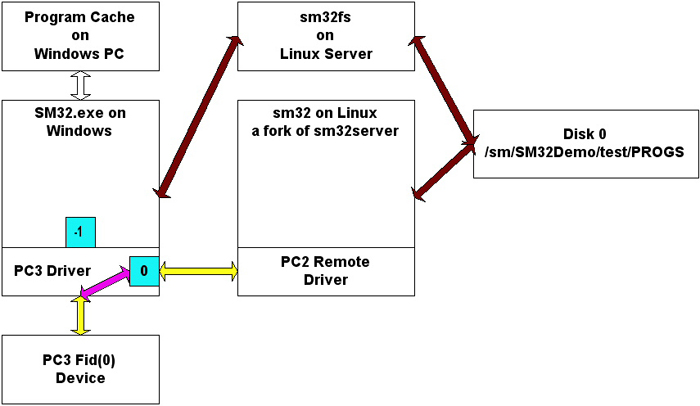 Consider the above diagram:
To get to this condition the following has already occurred:
- SM32.EXE has been executed
- The PC3 Driver would initialize the PC3 Device the
 would
connect to the -1 (local connection is #-1)
would
connect to the -1 (local connection is #-1)
- The Route specified on the Network page would establish a connection with a copy of sm32fs
- [DEMOLOGON]110 CONNECT 0,2,"192.168.1.104:5001","sm32user;demo457;/sm/SM32Demo/test;sm32;990000" causes:
- sm32server accepts the connection and creates the
 connection
- sm32server forks creating an instance of sm32.
- note that theis still connectted to -1.
- [$__RPCSERVE]70 PRINT (0,ERR=0160)'con'(0,A$), causes the
to goto connection 0.
- Now that linux sm32 has the PC3 Device it is able to print the READY message.
The switching of the PC3 Device is totally cooperative. That is once the local windows sm32 gives the connection to
a remote linux sm32 it pends until the linux sm32 decides to give it back.
Finally:RUN "DEMO2"
- sm32 under linux loads /sm/SM32Demo/test/PROGS/DEMO2 into memory and starts executing it.
- 135 RCALL "D_DEMO2",P![ALL],S$,C$ - is encountered
- The Program Name "D_DEMO2" and the 3 variables are packed into a single string variable.
- Internally something similar to PRINT 'CON'(-1,A$) is executed.(where A$ is the single string variable).
The data from the 'CON' mnemonic is placed into what could be thought of as the Keyboard buffer,
however this buffer can be as large as 800KB.
- Once the RCALL data is in the buffer the 'CON' moves theto the -1
connection
- sm32 under windows starts executing with:
- 80 READ RECORD(99,SIZ=-20000000,TIM=0,ERR=0160)A$ executes
- This READ RECORD places all the data from the "Keyboard buffer" into A$
- 120 LCALL A$,ERR=0140 executes
- The LCALL pulls the individual variables from A$ and places them into some internal variables that are
used to make the CALL.
- the equivalent of CALL "D_DEMO2",P![ALL],S$,C$ is executed
- sm32 under windows attempts to load "D_DEMO2" from the Program Cache if it is not
there it loads it via sm32fs and places it in the Program Cache.
- The call returns internally to the LCALL which packs any returned variable into A$
- 70 PRINT (0,ERR=0160)'con'(0,A$), executes placing the CALL results into
the "Keyboard Buffer"
- The 'CON' also switches the to connection 0,
pending windows and unpending linux.
- Linux is still in the middle of the 135 RCALL "D_DEMO2",P![ALL],S$,C$ that now reads the
returned variables from the "Keyboard Buffer".
Note if you RUN "DEMO2" again "D_DEMO2" will be found in the Program Cache.
Advantages of the SM32 Thin Client
- You only need to distribute SM32.EXE and SM32.SM32.
- Using the SMDE to Load your HTML into programs and then RCALLing those programs give you an
environment where your GUI interafce (the HTML) and the code nessesary to load the
Run Time data into that GUI reside on the Windows PC via the program cache.
- You then are only transferring Run Time data over your LAN.